Showing posts with label INFO LINKS COMPUTER ACADEMY. Show all posts

COMPUTER APPRECIATION CLASS PART VII: COMPUTER WARES


WELCOME TO THE COMPUTER APPRECIATION CLASS PART 7

We shall be learning all about the "COMPUTER WARES"

Computer wares are programs or device that helps the computer to function effectively.
The computer has three types of wares which are as follow:
1. HARDWARE
2. SOFTWARE
3. HUMAN WARE
  • THE COMPUTER HARDWARE

This is the physical parts of any computer. The hardware constitutes of the parts of a computer that can be felt, carry and transferred from one place to another. There can never be the soft without the hard. That is, the soft without the hard is no ware.
  • THE COMPUTER SOFTWARE

This is set of instruction given to the computer in order to perform a specific task or solve a particular problem. It is also known as program. The term software is applied to the programs, which must be placed in the hardware before the hardware/software combination can do useful work. Therefore without the software the computer is a dummy.
TYPES OF SOFTWARE
There are two types of software namely: system software and application software.
SYSTEM SOFTWARE
They are instructions written by computer manufacturers to control the operations of the computer system. They are programs that contribute to the control and performance of the computer system. Examples of system software include operating system, translator, data base management system and utility programs.
APPLICATION SOFTWARE
These are programs normally written by programmers/computer user within an organization which enable the computer to produce useful result. E.g. inventory control, attendance accounting, student records, etc.
TYPES OF APPLICATION SOFTWARE
Application software is grouped into two main software namely: User application programs and Application packages.
USER APPLICATION PROGRAMS
These are programs written by the user in order to perform specific job for the user. Such programs are written in variety of programming languages according to circumstance but must be written in a systematic way so as to produce desired result.
APPLICATION PACKAGES
Also called software packages are already written programs or suite of programs for a particular application area, which must conform to internationally accepted rules. E.g. Word processing packages (MS word, Word perfect, PageMaker), Graphic design packages (Symphony, Fantasy, Harvard graphics), Spread Sheet packages (MS Excel, Quattro Pro), etc.
THE HUMANWARE
Human ware:
The man-machine interface is called a human ware. The people who work with the computer are collectively called the human ware or livewire.

Like we all know that computer is automatic (but under the supervision of human), it need human to activate (initialize) it before the combination of hardware/software can execute any job (work). Human-ware (also known as people-ware) doesn’t include those that can not operate computer. Human-ware includes programmer, operator, etc. Anybody that can guide computer to perform (execute) task is a human-ware.
The computer is made of two wares (which are hardware and software). But for a computer to carry out any operation, three wares are needed which include the above mentioned two and the human-ware. Come to think of it, this machine work on data and these data will be fed via its’ input device into the computer. People-ware is those responsible for inputting data. Without the human-ware the computer can not work on his own. For example, you have a software but you did not slot it into the DVD ROM do you expect the software to find is way into the computer with your assistance. of course the computer needs you to work.

Wow. I guess you understand the computer class today. If you have any question please comment or call 07033539930.

THANKS FOR READING


COMPUTER APPRECIATION PART VI: COMPUTER PORTS AND ITS FUNCTIONS


WELCOME TO THE COMPUTER APPRECIATION CLASS PART 6

We shall be focusing on " COMPUTER PORTS AND ITS FUNCTIONS

Acording to Chinonso Nwakaeme a port is the external device on the computer that can be use for connections. Computer dictionary define, A port as a physical docking point which an external device can be connected to the computer. It can also be programmatic docking point through which information flows from a program to the computer or over the Internet.
In computer terms, a port generally refers to the female part of connection. Computer ports have many uses, to connect a monitorwebcamspeakers, or other peripheral devices

Characteristics of Ports

A port has the following characteristics −
1. It is a connecting device
2. It is the external device on the computer
Other characteristics:
*External devices are connected to a computer using cables and ports.
*Ports are slots on the motherboard into which a cable of external device is plugged in.
*Examples of external devices attached via ports are the mouse, keyboard, monitor, microphone, speakers, etc.
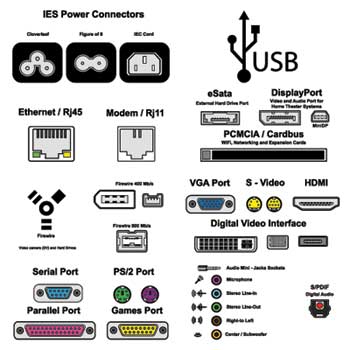
Computer Ports
Let us now discuss a few important types of ports −

Serial Port

Serial port has two versions: 9 pin, 25 pin model and data travels at 115 kilobits per second

  • It is use for external modems and older computer mouse

Parallel Port

Parallel Port is also called printer port. it has 25 pin model. it is a IEEE 1284-compliant Centronics port


  • It is use for scanners and printers

PS/2 Port

It is also called mouse port. Most of the old computers provide two PS/2 port, each for the mouse and keyboard.  it is IEEE 1284-compliant Centronics port
  • It is use for old computer keyboard and mouse

Universal Serial Bus (or USB) Port

It was introduced in 1997. Most of the computers provide two USB ports as minimum. while data travels at 12 megabits per seconds. Note that USB compliant devices can get power from a USB port.

It can connect all kinds of external USB devices such as external hard disk, printer, scanner, mouse, keyboard, etc.

VGA Port

It has 15 holes that is similar to the serial port connector. However, serial port connector has pins, VGA port has holes.
  • It connects monitor to a computer's video card.

Power Connector

The Power Connector  is a three-pronged plug.

  • It connects to the computer's power cable that plugs into a power bar or wall socket.

Firewire Port

The data travels at 400 to 800 megabits per seconds. Invented by Apple. It has three variants: 4-Pin FireWire 400 connector, 6-Pin FireWire 400 connector, and 9-Pin FireWire 800 connector.
  • Transfers large amount of data at very fast speed.
  • Connects camcorders and video equipment to the computer.

Modem Port


  • Connects a PC's modem to the telephone network.

Ethernet Port

This port resides on an Ethernet Card. Data travels at 10 megabits to 1000 megabits per seconds depending upon the network bandwidth.

  • It connects to a network and high speed Internet.
  • It connects the network cable to a computer.


Game Port

It is currently replaced by USB
  • Connect a joystick to a PC

Digital Video Interface, DVI port

DVI port is commonly popular among video card manufacturers.
  • Connects Flat panel LCD monitor to the computer's high-end video graphic cards.

Sockets

  • Sockets connect the microphone and speakers to the sound card of the computer.


We know you enjoyed this tutorial. Please note that we are left with PART 7 and PART 8. You are hereby expected to prepare for your assesment, if you want to get certified.


THANKS FOR READING


ONLINE BUSINESS ACADEMY AWARDS

HERE ARE THE CATEGORIES OF AWARDS FOR THE 2019 ONLINE BUSINESS AWARDS. First of all, I thank everyone who participated in this ACAD...